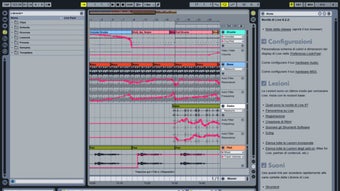



Download Ableton Live Intro – affordable music production software for Windows & macOS
Overview
Ableton Live Intro is the entry‑level version of the acclaimed Ableton Live family, designed especially for musicians, producers, and DJs who want a powerful yet lightweight digital audio workstation (DAW). While it strips away some of the advanced capabilities found in Standard and Suite, Live Intro still packs a complete workflow for composing, arranging, and performing music. Users receive a curated library of over 1,500 loops, samples, and instrument presets that cover a broad spectrum of genres—from electronic dance music to acoustic folk.
The interface is intuitive: the Session View encourages spontaneous, loop‑based creation, while the Arrangement View provides a traditional timeline for detailed editing. Ableton’s renowned warp engine lets you stretch and manipulate audio in real time, ensuring that even the most imperfect recordings can be transformed into polished tracks. Because it’s a “starter” edition, the software is priced competitively, making it an ideal choice for hobbyists, students, and anyone testing the Ableton ecosystem before committing to a larger investment.
Whether you’re recording a home‑studio guitar riff, programming synth patterns, or preparing a live set, Ableton Live Intro offers a secure, stable platform that updates regularly through Ableton’s seamless online updater.
Core Features
What you get out of the box
- Session & Arrangement Views – Switch effortlessly between loop‑centric improvisation and linear composition.
- 1500+ Audio & MIDI Loops – A ready‑made sound library that spans drums, bass, synths, and world instruments.
- 8 Software Instruments – Includes Analog, Operator, and Impulse, giving you synth, drum machine, and sampler capabilities.
- Audio Warp Engine – Real‑time time‑stretching and pitch‑shifting without artifacts.
- MIDI Mapping & Control Surface Support – Map hardware knobs, pads, and faders to any parameter for tactile performance.
- Clip Automation – Record automation directly into clips for dynamic, evolving arrangements.
- Export & Render Options – Bounce tracks to WAV, AIFF, or MP3 with customizable bit depth and sample rate.
- Built‑in Effects Suite – Includes EQ Eight, Compressor, Reverb, Delay, and more for shaping sound.
Even though Live Intro limits the number of audio and MIDI tracks (up to 16), the feature set mirrors the workflow philosophy of the full Live platform. This means you can start a project in Intro and later migrate the .als file to Standard or Suite without losing any arrangement data. The software also integrates tightly with Ableton’s Push hardware, allowing you to experiment with finger‑driven sequencing and hands‑on sound design. For creators who value speed, the streamlined UI reduces menu clutter, letting you focus on music rather than endless settings. Regular updates bring new packs, bug fixes, and performance improvements, ensuring that the program stays secure and compatible with the latest operating system releases.
Installation & Usage Guide
Step‑by‑step setup for Windows and macOS
Downloading Ableton Live Intro is straightforward. Visit the official Ableton website, locate the Live Intro product page, and click the Download for Windows or Download for macOS button. The installer size is roughly 2 GB, and a stable internet connection is recommended to avoid corrupted files. Once the download completes, follow these platform‑specific steps:
- Windows: Run the
Live_Intro_Installer.exefile. The wizard will guide you through license agreement acceptance, destination folder selection (default isC:\Program Files\Ableton\Live 11 Intro), and optional component choices such as additional sound packs. After installation, launch the application from the Start menu. - macOS: Open the
Live_Intro_Installer.dmgfile, drag the Ableton Live icon into the Applications folder, and confirm any security prompts that appear. macOS may require you to allow the app in System Preferences → Security & Privacy → General.
Upon first launch, you’ll be prompted to activate the software using the serial number emailed after purchase. Activation requires an internet connection, after which the program registers the license locally. Ableton’s built‑in “First‑Run Wizard” helps you configure audio preferences: select your audio interface, set the sample rate (44.1 kHz is standard for most projects), and adjust buffer size for optimal latency. For MIDI controllers, the wizard can automatically detect and map basic functions, but you can fine‑tune mappings later in the Preferences > Link/MIDI panel.
Once configured, you can start a new project by clicking File → New Live Set. The default template includes a few audio tracks, a MIDI track, and the Impulse drum rack, giving you a sandbox to experiment. Drag loops from the Browser on the left onto a Session View clip slot, or record directly into a track using a microphone or instrument input.
The workflow encourages rapid iteration: you can loop a four‑bar phrase, add effects on the fly, and trigger scenes for live performance. When you’re ready to export, choose File → Export Audio/Video, select the desired format, and let Ableton render your composition. The entire process—from download to first export—typically takes less than 30 minutes for a new user, highlighting the software’s user‑friendly design.
Compatibility, Pros & Cons
System requirements and real‑world advantages
Ableton Live Intro runs natively on Windows 10 (64‑bit) or later and macOS 11 (Big Sur) or later. Minimum specifications include a dual‑core CPU, 4 GB RAM (8 GB recommended), and at least 8 GB of free disk space for installation and sample libraries. For low‑latency audio work, a dedicated audio interface with ASIO drivers (Windows) or Core Audio (macOS) is advisable. The software does not support iOS or Android devices, but Ableton’s Link technology enables synchronization with mobile apps that support the protocol, allowing you to incorporate tablet‑based instruments into a Live Intro session.
Pros
- Affordably priced entry point to the Ableton ecosystem.
- Intuitive dual‑view workflow suitable for both studio production and live performance.
- Rich library of loops, samples, and eight built‑in instruments.
- Robust audio warping and real‑time manipulation features.
- Seamless upgrade path to Standard or Suite without losing projects.
- Regular free updates keep the software secure and compatible.
Cons
- Limited to 16 audio and MIDI tracks, which may constrain larger arrangements.
- Missing some advanced effects and Max for Live devices found in higher editions.
- No native support for iOS/Android apps beyond Link synchronization.
- Sample library, while extensive, is smaller than the one bundled with Live Suite.
Ableton Live Intro strikes an impressive balance between affordability and functionality. Its core features are more than sufficient for beginners and intermediate producers, and the ability to upgrade later ensures that the investment grows with your skill set. The primary limitation—track count—only becomes noticeable for complex productions, which means most users will find the software more than adequate for everyday music creation.
Frequently Asked Questions
Can I try Ableton Live Intro before buying?
Yes, Ableton offers a 30‑day free trial that includes all Intro features. You can download the trial version from the official Ableton website, register an account, and evaluate the software without any limitations during the trial period.
Is Ableton Live Intro compatible with third‑party VST plugins?
Absolutely. Live Intro supports both VST2 and VST3 plug‑ins on Windows and macOS. After installing a plug‑in, it appears in the Plug‑Ins folder of the Browser, ready to be dragged onto any MIDI or audio track.
Can I upgrade my project from Intro to Standard later?
Yes. Your .als project files are fully compatible across all Ableton Live editions. Purchasing an upgrade unlocks additional tracks, instruments, and effects, and you can continue working on the same set without any conversion steps.
What is the minimum hardware required to run Live Intro smoothly?
A dual‑core processor, 4 GB RAM (8 GB recommended), and 8 GB of free disk space are the absolute minimum. For low latency and larger projects, a faster CPU, 8 GB+ RAM, and an external audio interface are strongly advised.
Does Ableton Live Intro support collaborative workflow?
While Live Intro does not include Ableton’s built‑in cloud collaboration tools, you can share project files manually via email, Dropbox, or any file‑sharing service. The receiving user must also have Live Intro or a higher edition to open the file.
Conclusion & Call to Action
Ableton Live Intro offers an accessible gateway into professional music production without overwhelming new users with a massive feature set. Its blend of intuitive workflow, high‑quality sounds, and reliable performance makes it a compelling choice for anyone looking to start creating, remixing, or performing electronic music. At a price point that undercuts many competing DAWs, it delivers more value than most entry‑level software on the market. If you’re ready to explore the world of Ableton, simply click the download button below, install the trial, and experience the power of Live Intro firsthand. Should you outgrow the track limits or crave advanced effects, upgrading to Ableton Live Standard or Suite is a seamless transition that preserves all your work.
Download Ableton Live Intro now and start shaping your musical ideas today.







